
What you can do in Inventory
The Inventory module helps you manage everything related to parts and stock.
You can:
-
Track parts and tools across locations
-
Monitor stock levels and availability
-
Receive and inspect incoming items
-
Manage batches and serialized items
-
Reserve parts for maintenance work
-
Identify low stock and reorder needs
Key areas in Inventory
Inventory is divided into pages that reflect your daily workflows:
-
Stock – View current stock levels across locations
-
Items – Manage part numbers and inventory items
-
Serialized Items – Track individual components with unique serial numbers
-
Tool Instances – Manage tools and their usage
-
Locations – Organize where items are stored
-
Batches – Track part history, expiry, and traceability
-
Receiving Inspections – Handle incoming parts and documentation
-
Quarantines – Isolate items that require review
-
Reservations – Reserve parts for work orders
-
Adjustments – Correct stock discrepancies
-
Stock Counts – Perform inventory checks
-
Transactions – View all inventory movements
-
Documents – Store related documentation
Using the Inventory dashboard
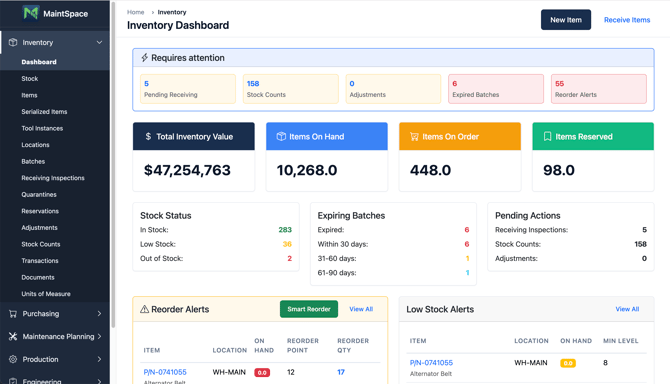
The Inventory dashboard gives you a quick overview of your current status.
You can see:
-
Total inventory value
-
Items on hand, on order, and reserved
-
Low stock and reorder alerts
-
Expired and expiring batches
-
Pending actions like receiving inspections and stock counts
Use this overview to identify what requires attention before starting your work.
Common actions
You can perform key tasks directly from the dashboard:
1. Click “New Item” to create a new part
2. Click “Receive Items” to register incoming stock
These actions help you quickly keep your inventory up to date.
How Inventory supports maintenance
Inventory is closely connected to your maintenance workflows.
-
Parts are reserved for work orders
-
Stock levels affect maintenance planning
-
Missing parts can trigger purchasing
-
Traceability ensures compliance and audit readiness
Keeping your inventory accurate helps avoid delays and ensures safe, compliant operations.
Tips
-
Keep stock levels updated to avoid delays in maintenance
-
Use batches and serialized items for full traceability
-
Complete receiving inspections before using parts
-
Monitor reorder alerts to prevent stockouts